Sending and Receiving Bitcoin
The first time you send Bitcoin, your finger hovers over the confirm button a little longer than usual. This is completely normal. Unlike a bank transfer, where your bank might catch a mistake or let you recall a payment within hours, Bitcoin gives you no such safety net. Once you press send and the transaction confirms, it is done.
This chapter walks you through exactly what happens when you send or receive Bitcoin, so you can act with confidence rather than anxiety.
What is a Bitcoin Address?
A Bitcoin address is like an account number you generate yourself — except no bank issues it. Your wallet software creates it mathematically from your private key.
An address looks like a string of letters and numbers. Modern Bitcoin addresses using the most current format start with "bc1q" or "bc1p" and look something like this: bc1qar0srrr7xfkvy5l643lydnw9re59gtzzwf5mdq
Unlike a bank account number, which stays the same your whole life, Bitcoin addresses are designed to be used once and discarded. Modern wallets generate a fresh address for each payment you receive. This is not a technical requirement — coins sent to a reused address still arrive safely — but it is a significant privacy improvement. When you reuse an address, anyone who knows that address can see all past and future payments associated with it. A fresh address for each transaction prevents this.
When you want to receive Bitcoin, you share your address with the sender. They enter it in their wallet, confirm the amount, and the transaction is on its way.
How to Send Bitcoin: Step by Step
Sending Bitcoin with a modern wallet is a short process. Understanding each step gives you confidence that nothing will go wrong.
Step 1 — Open your wallet and find the Send function. Every wallet is slightly different but all have a clearly labeled send or pay option.
Step 2 — Enter or scan the recipient's address. You can type the address manually (risky — it is long and easy to mistype), paste it from your clipboard, or scan a QR code. Scanning a QR code is the safest method when available because it eliminates transcription errors.
Step 3 — Enter the amount. Most wallets let you enter the amount in Bitcoin (BTC), in satoshis (sats), or in your local currency (CHF, EUR). If you enter CHF 50, the wallet converts it to the equivalent Bitcoin at the current exchange rate.
Step 4 — Select a fee level. The wallet will suggest fee options, often labeled "slow," "standard," and "fast." We explain fees in detail below. For non-urgent payments, the standard option is fine.
Step 5 — Review and confirm. Before you press confirm, read the recipient address, the amount, and the fee one more time. Verify at minimum the first four and last four characters of the address match what the recipient showed you.
Step 6 — Sign and broadcast. Your wallet signs the transaction with your private key and sends it to the Bitcoin network. Within seconds it appears in the mempool (the waiting room for unconfirmed transactions). Within minutes to an hour, depending on the fee you chose, a miner includes it in a block and it receives its first confirmation.
Understanding UTXOs
Bitcoin does not track your balance as a single number the way a bank does. Instead, it tracks what are called Unspent Transaction Outputs, or UTXOs.
Think of UTXOs as physical coins or banknotes in your wallet. If you have received Bitcoin in three separate transactions — say, 0.05 BTC, 0.03 BTC, and 0.02 BTC — your wallet holds three separate UTXOs. Your total balance is 0.10 BTC, but it is composed of three distinct pieces.
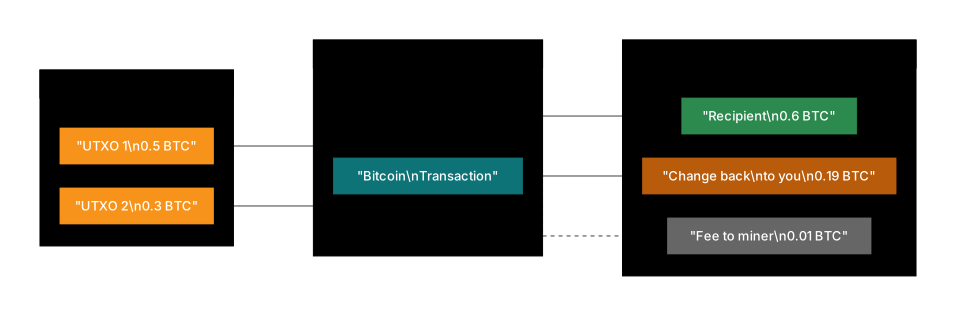
When you spend Bitcoin, you must use one or more UTXOs as inputs. If you want to pay 0.06 BTC and your only available UTXO is 0.10 BTC, your wallet spends the entire 0.10 BTC UTXO: 0.06 BTC goes to the recipient, some amount goes to the miner as a fee, and the remainder comes back to you as change (explained below).
If you want to pay 0.04 BTC and you have two UTXOs of 0.03 BTC and 0.02 BTC, your wallet may combine them: both inputs go in, 0.04 BTC goes to the recipient, and the remainder minus fees returns to you.
Your wallet manages all of this automatically. You do not need to think about UTXOs during a normal transaction. But understanding the concept helps explain why your wallet sometimes shows more transaction activity than you expected, and why some transactions cost more in fees than others.
How Transaction Fees Work
Bitcoin transaction fees are not based on the amount you send. Sending 0.001 BTC and sending 10 BTC cost the same in fees if the transactions are the same size in bytes.
Fees are based on data size — how many bytes the transaction takes up in a block. A transaction with multiple inputs (because it is spending several UTXOs) is larger than one with a single input, and therefore costs more in fees.
The fee market works like an auction. Block space is limited. When many people want to transact at the same time, they compete by offering higher fees to get their transactions included first. During quiet periods, fees fall to minimal levels. During peak demand — typically during price rallies or surges of on-chain activity — fees can rise substantially.
In early 2025, typical on-chain fees for a standard transaction ranged from roughly USD 0.50 to USD 2.00 under normal conditions. During the peak of the Ordinals inscription wave in late 2023 and again when Runes launched in April 2024, fees temporarily rose to USD 30–50 per transaction or more.
For most regular payments, your wallet's suggested fee is appropriate. If your transaction is not urgent, choosing a lower fee means waiting longer for confirmation — often just an hour or two longer, not days. For time-sensitive payments such as buying from a merchant or locking in a price, pay the standard or fast fee.
What is a Change Address?
When you spend a UTXO that is larger than the amount you want to send, the leftover amount comes back to you. This is called change, and it works identically to receiving change when you pay cash in a shop.
Your wallet sends this change to a new address it controls — called a change address. This is done automatically and the coins are still yours. If you see an unexpected address in your transaction history receiving a small amount, it is very likely your own change address.
Modern wallets generate fresh change addresses automatically to improve your privacy. A change address that is reused becomes a link that makes it easier for outside observers to cluster your activity together.
Key Safety Habits
A few habits prevent the most common costly mistakes:
Always verify the full address — or at minimum the first and last several characters. Malware exists specifically to intercept clipboard operations and replace Bitcoin addresses with addresses controlled by the attacker. You copy an address, paste it, and the pasted address is not the one you copied. This attack is called a clipboard hijacker and it has stolen significant amounts from inattentive users. Always glance at the pasted address to confirm it matches.
Use QR codes from trusted sources. When paying someone in person or on a verified merchant site, scanning a QR code is safer than manual entry. Do not scan QR codes from strangers, from printed materials in public places, or from emails.
Send a small test transaction first when using a new address. If you are sending a large amount to a new recipient for the first time — especially to a hardware wallet you are setting up or a new exchange — send a small amount first, confirm it arrives, and then send the full amount. The cost of one small test transaction is trivial compared to the cost of discovering you have been using the wrong address.
Double-check amounts and units. Bitcoin amounts are small numbers. It is easy to enter 0.1 BTC when you meant 0.01 BTC — a tenfold error. Some wallets let you enter the equivalent in local currency, which can reduce this type of mistake.
Risk Note
Bitcoin transactions are irreversible. Sending to a wrong address is permanent. Malware can silently replace pasted addresses. Always verify the recipient address before confirming. These are not edge cases — address replacement malware is actively circulating and has caused documented losses.
Reader Takeaway
- Bitcoin addresses are generated by your wallet. Use a fresh one for each incoming payment to improve privacy.
- UTXOs are the individual "coins" your wallet holds. Spending them follows the same logic as paying with cash.
- Fees depend on transaction data size, not the amount sent. Higher fees mean faster confirmation.
- Change from a transaction returns to a new address you control — this is normal.
- Always verify the recipient address visually before confirming any transaction.
Chapter Summary
- A Bitcoin address is a unique string derived from your private key. Share it to receive Bitcoin. Use a fresh address each time for privacy.
- Sending Bitcoin involves entering the address, amount, and fee, then signing and broadcasting. The process takes seconds; confirmation takes minutes.
- UTXOs are the building blocks of your Bitcoin balance. Spending them works like paying with cash — you hand over coins, get change back if needed.
- Fees are based on transaction data size, not the value transferred. They vary with network demand.
- Before sending any significant amount, verify the address, double-check the amount, and consider a small test transaction to a new recipient.
References
- Nakamoto, S. Bitcoin: A Peer-to-Peer Electronic Cash System (bitcoin.org)
- Antonopoulos, A. Mastering Bitcoin. O'Reilly
- Narayanan, A. et al. Bitcoin and Cryptocurrency Technologies. Princeton
- Bitcoin.org: Developer Guide — Transactions
- Mempool.space: live fee estimates and transaction tracking
Was this helpful? Continue with the next chapter via the sidebar.
This content is educational and does not constitute financial advice.